
Parquet_fdw (Foreign Data Wrappers) in PostgreSQL
In this article, I am going to explain you what is foreign dara wrapper parquet_fdw, installation of parquet fdw extension and how to use parquet fdw in Postgres.
I will also guide you what is postgres and best practices of foreign data wrapper in postgresql and one example to install the extension and use the parquet file to access remote data inside PostgreSql.
Here are the high level steps we will follow to understand parquet fdw:
- What is foreign data wrapper
- Parquet format files example of parquet fdw
- Does Postgres support parquet files?
- Postgres Parquet fdw extension Installation
- Best practices for using Foreign Data Wrapper in PostgreSQL
What is Foreign Data Wrapper? FDW Meaning
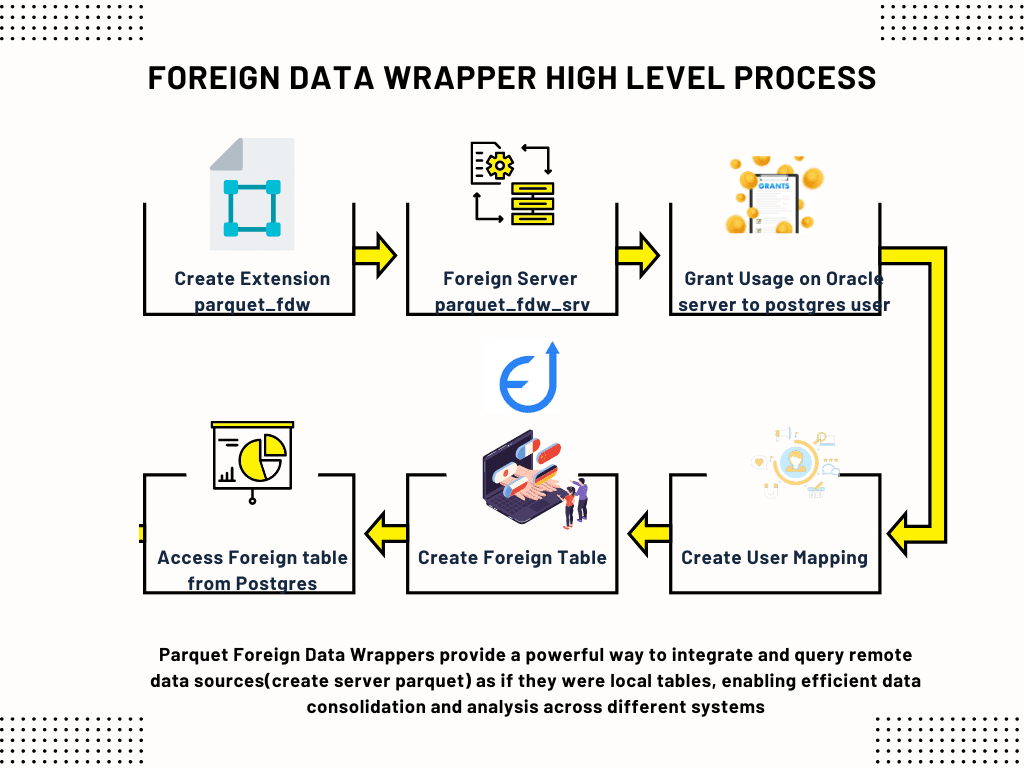
A foreign data wrapper(postgres parquet fdw) is a open source library that can communicate with an external data source, hiding the details of connecting to the data source and obtaining data from it. (FDW means) Parquet Foreign Data Wrappers provide a powerful way to integrate and query remote data sources(create server parquet) as if they were local tables, enabling efficient data consolidation and analysis across different systems. It is becoming very easy to access parquet to postgres database using foreign data wrapper.
In PostgreSQL, integrating foreign data is a breeze. Start by creating a foreign server object(create server parquet), which acts as a connection point to external data sources based on specific options. Next, create a foreign table to outline the structure of remote data. These tables function like regular ones but don’t take up space in the PostgreSQL server. Instead, they trigger PostgreSQL to interact with the foreign data wrapper(create extension) for data retrieval or transmission during updates and you can access parquet to postgres database.
Moreover, manage authentication for remote data access(local file system or amazon s3) through user mappings. However, these mappings can provide vital information, including user credentials, based on the current PostgreSQL role. But make sure tp elevate your database capabilities by efficiently accessing and utilizing foreign data sources with PostgreSQL.
Parquet format files example of postgres parquet_fdw
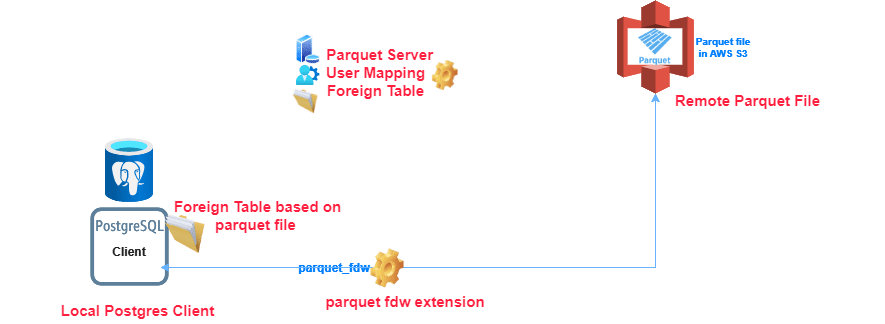
Let’s assume we have database with very important data storage and very big database. We also keep the data’s history, log and error tables, those are used to store all the history of updates, error and log of main tables. But, we are keeping all the updates in different log and history tables. So, the history tables are very big in size. This is impacting overall database performance. However, those tables are not required to keep in main databases as those are not required frequently. So, we can keep those tables(as remote tables) in remote server (amazon s3 storage format as select of parquet file) as cost effective storages. We can access those data as and when required from the parquet files and as good as local database tables. So you can access parquet to postgres database using fdw.
Does Postgres support parquet files?
PostgreSQL, with the right extensions or tools, supports Parquet files. One widely used extension is “pg_parquet”. It equips PostgreSQL with functions tailored for handling Parquet files.
However, it’s important to note that incorporating Parquet files into PostgreSQL may entail some setup and configuration. Also, ensure compatibility with your specific PostgreSQL version. Keep in mind that the performance and capabilities may vary based on the chosen extension or tool.
Read more about Parquest File Format and how to read parquet file in Postgres in my earlier blog post.
PostgreSql parquet_fdw Extension Installation
Setting up parquet_fdw is a breeze with libarrow and libparquet (v0.15+ or arrow-0.14 for earlier versions) installed. For detailed guidance, visit the libarrow installation page or building guide. Execute the following command to build parquet_fdw:
make installIn case PostgreSQL is in a custom location, use:
make install PG_CONFIG=/path/to/pg_configCustomize compilation flags via CCFLAGS or standard PG_CFLAGS, PG_CXXFLAGS, PG_CPPFLAGS variables.
1. Create Extension parquet_fdw
You need to create extension parquet fdw to use the posrgres foreign data wrapper functionality as given below:
CREATE EXTENSION parquet_fdw2. Place Parquet file in the remote location
If you have the parquet file then place the file in the remote server. If you have csv file then need to convert the file in the parquet format. You can see how you can convert CSV file in to parquet file in my earlier post. Let’s call this file as employee_details.parquet
3. Create a Foreign Server Pointing to Parquet File
We need to create create a foreign server parquet_srv. During creation of remote server we need not give the user password of remote server. It will be treated as a server foreign data wrapper and parquet_fdw will access external data from the remote server file system given in foreign data wrapper options directory. By default, all connections that Parquet FDW establishes to foreign servers are kept open in the local session for re-use.
CREATE SERVER parquet_srv
FOREIGN DATA WRAPPER parquet_fdw
OPTIONS ( format 'parquet',
          directory '/var/lib/postgresql/data/pgdata/'
);4. Create User Mapping for postgres user to the parquet server
If you have a already existing database user you can use it. Otherwise, you need to create a user. Then create the user mapping for the database user for the newly created parquet server(parquet_srv).
CREATE USER MAPPING FOR postgres
SERVER parquet_srv5. Create a Foreign Table in Postgres
Create Foreign table parquet_employees with server as created parquet server and server options as amazon s3 file for selecting of parquet file. Foreign Table Creation support selection of parquet file by filename clause. Create Foreign Table’s data types should be match with the data types of the external data in parquet file in the remote server/ local filesystem.
CREATE FOREIGN TABLE parquet_employees
(emp_id integer,
 employee_name text,
 dateofbirth text,
 addresss text
)
SERVER parquet_srv
OPTIONS (filename 'employee_datails.parquet');6. Access Parquet File Based Foreign Table
Now you can access the remote tables parquet_employess as you are accessing normal table using the fdw user. All the data in the parquet file can be accessed read only.
SELECT * FROM parquet_employeesBest practices for using parquet_fdw in PostgreSQL
To make the most out of the Foreign Data Wrapper in PostgreSQL, it’s important to follow a few best practices:
1. Plan your data integration: Before setting up the Foreign Data Wrapper, carefully plan the integration of external data sources into your PostgreSQL database. Moreover, consider the data volume, frequency of updates, and potential performance implications. With this consideration, it will help you design an efficient and scalable solution.
2. Optimize query performance: Pay attention to query performance when working with foreign data. Be it analyze query plans, optimize indexes, or consider caching mechanisms to minimize latency and improve response times.
3. Secure your connections: When establishing connections to external data sources, ensure that sensitive information, such as usernames and passwords, are properly secured. Use encrypted connections when possible to protect data in transit.
4. Monitor and maintain your setup: Regularly monitor the performance and stability of your Foreign Data Wrapper setup. Keep an eye on resource utilization, query latency, and error logs. Perform routine maintenance tasks, such as vacuuming and analyzing foreign tables, to ensure optimal performance.
Conclusion
The Foreign Data Wrapper in PostgreSQL is a powerful tool that enables organizations to effortlessly expand their data horizons. By seamlessly integrating data from external sources into their PostgreSQL databases, businesses can tap into a wider range of data, harnessing valuable insights and gaining a competitive edge.
In this article, we explored the capabilities and benefits of leveraging Foreign Data Wrapper in PostgreSQL. We discussed the process of setting up the Foreign Data Wrapper, connecting to external data sources, querying foreign data, and optimizing performance. We also highlighted examples of using the Foreign Data Wrapper with different data sources and covered advanced features and best practices.
To learn more about the Foreign Data Wrapper and its usage in PostgreSQL, refer to the official PostgreSQL documentation. Additionally, there are numerous online resources and tutorials available that provide in-depth guidance and examples for leveraging the Foreign Data Wrapper effectively.
With the Foreign Data Wrapper at your disposal, you can effortlessly expand your data horizon, revolutionize your data analysis workflows, and unlock the full potential of your PostgreSQL database. Similarly you can access data from another remote postgres database server and access from postgres as foreign table using foreign data wrapper postgres fdw and oracle fdw extension. Also in postgres read parquet file easily with pandas/pyspark library. I described in detail with complete example in my earlier blog.


Pingback: Understanding Postgres Oracle fdw in 5 Minutes
Pingback: How to Open Parquet File in Python – Enodeas
Pingback: FDW PostgreSQL: Foreign Data Wrappers in 5 Minutes – Enodeas
Pingback: How to Use postgres fdw: Foreign Data Wrapper – Enodeas