
Oracle APEX Architecture
In the previous article, we introduced Oracle APEX and explored why it has become one of the most popular low-code platforms for Oracle Database developers. Before you start building applications, it’s important to understand the Oracle APEX architecture.
Unlike traditional web applications that require separate application servers and complex middleware, Oracle APEX follows a streamlined architecture where the Oracle Database plays the central role. This architecture simplifies deployment, improves security, and delivers excellent performance.
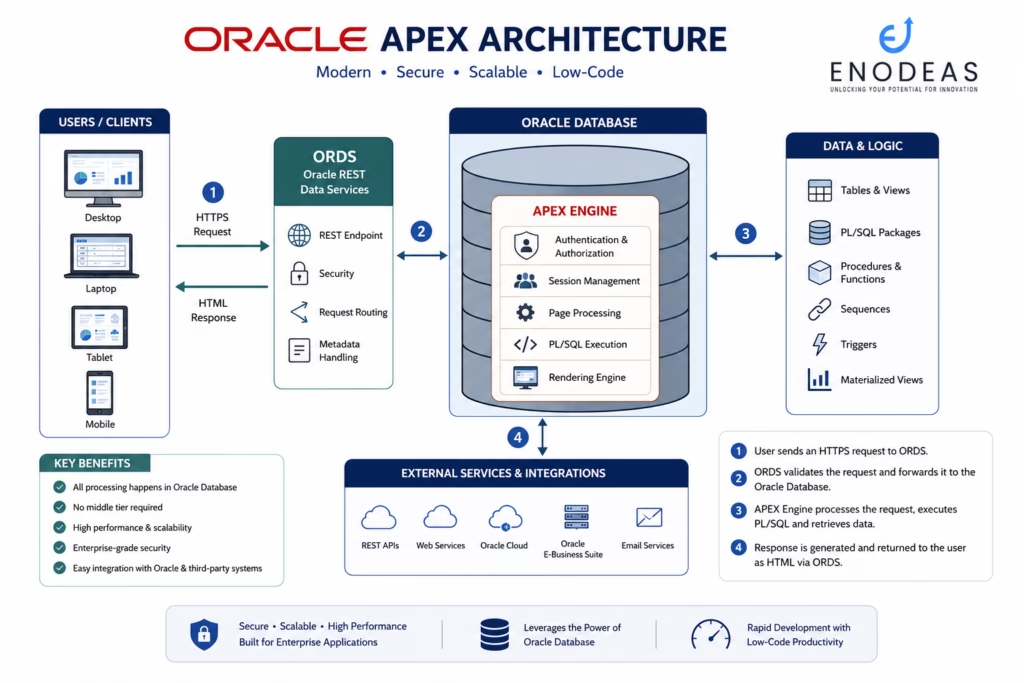
In this article, we’ll walk through the Oracle APEX Architecture using the diagram below and explain how every request travels from the user’s browser to the Oracle Database and back.
Recommended Diagram: Use the Oracle APEX Architecture diagram shown at the beginning of this article.
What is Oracle APEX Architecture?
Oracle APEX Architecture defines how different APEX components work together to process user requests and generate dynamic web pages.
The core components include:
- User (Browser)
- Oracle REST Data Services (ORDS)
- Oracle Database
- Oracle APEX Engine
- Database Objects
- External Services
The beauty of Oracle APEX is that the application logic runs inside the Oracle Database, eliminating the need for a traditional middle-tier application server.
Oracle APEX Architecture Overview
The Oracle APEX architecture consists of six major components:
1. Users / Clients
Users access Oracle APEX applications through a URL in a web browser on:
- Desktop
- Laptop
- Tablet
- Mobile Device
No software installation is required on the client side. Users simply open a URL and interact with the application.
2. Oracle REST Data Services (ORDS)
ORDS acts as the web listener between the user’s browser and the Oracle Database.
Its responsibilities include:
- Receiving HTTP/HTTPS requests
- Managing user sessions
- Authentication
- Routing requests
- Communicating with the Oracle Database
- Returning generated HTML pages
Think of ORDS as the gateway that securely connects users to Oracle APEX.
3. Oracle Database
The Oracle Database is the heart of every Oracle APEX application.
It stores:
- Application metadata
- Business data
- Security information
- User sessions
- PL/SQL packages
- SQL queries
Unlike many other development frameworks, Oracle APEX does not require a separate application database.
4. Oracle APEX Engine
The APEX Engine processes every request received through ORDS.
Its responsibilities include:
- Page rendering
- Authentication
- Authorization
- Session management
- Executing SQL
- Executing PL/SQL
- Running validations
- Processing page items
- Generating HTML
The APEX Engine is installed inside the Oracle Database and is responsible for converting your application definitions into a fully functional web application.
5. Data & Business Logic
Oracle APEX works directly with Oracle Database objects, including:
- Tables
- Views
- PL/SQL Packages
- Stored Procedures
- Functions
- Sequences
- Triggers
- Materialized Views
This close integration eliminates the need for additional ORM layers or middleware.
6. External Services & Integrations
Modern enterprise applications rarely work in isolation. Oracle APEX integrates easily with:
- REST APIs
- SOAP Web Services
- Oracle Cloud Infrastructure (OCI)
- Oracle E-Business Suite
- Email Services
- Third-party applications
This makes Oracle APEX an excellent choice for enterprise integration projects.
Request Flow Explained
Let’s understand how Oracle APEX processes a user request.
Step 1 – User Sends an HTTPS Request
A user opens an Oracle APEX application in a browser.
Example:
https://apex.enodeas.com/ords/r/demo/homeThe browser sends an HTTPS request to Oracle REST Data Services (ORDS).
Step 2 – ORDS Receives the Request
ORDS validates the request and establishes a connection to the Oracle Database.
Responsibilities include:
- URL routing
- Security checks
- Session validation
- Connection management
Step 3 – Oracle APEX Engine Processes the Request
The Oracle APEX Engine performs the following tasks:
- Authenticates the user
- Checks authorization
- Executes SQL queries
- Calls PL/SQL packages
- Retrieves required data
- Applies validations
- Generates page components
Step 4 – HTML Response is Returned
Once processing is complete:
- HTML
- CSS
- JavaScript
are generated and sent back through ORDS to the user’s browser.
The user sees the completed web page without knowing the processing that happened behind the scenes.
Why Oracle APEX Architecture is So Fast
Oracle APEX delivers excellent performance because:
- Business logic runs inside the database.
- Minimal network communication.
- No separate application server is required.
- SQL executes directly in Oracle Database.
- Optimized session management.
- Efficient page rendering.
These design principles reduce latency and improve scalability.
Security in Oracle APEX Architecture
Security is built into the architecture.
Oracle APEX provides:
- Authentication
- Authorization
- Session State Protection
- SQL Injection Prevention
- Cross-Site Scripting (XSS) Protection
- Cross-Site Request Forgery (CSRF) Protection
Since applications run on Oracle Database, they also benefit from Oracle’s mature database security features.
Oracle APEX Architecture with Oracle E-Business Suite
One of the biggest advantages of Oracle APEX is its seamless integration with Oracle E-Business Suite (EBS).
A typical architecture looks like this:
User
   │
Oracle APEX
   │
ORDS
   │
Oracle Database
   │
Oracle EBS APIs
   │
Oracle EBS Modules
Using this approach, organizations can:
- Build modern self-service portals
- Develop procurement workflows
- Display executive dashboards
- Extend Oracle EBS functionality
- Call Oracle EBS public APIs
- Create mobile-friendly applications without customizing standard EBS forms
This architecture is ideal for organizations that want to modernize their Oracle EBS environment while preserving core ERP functionality.
Advantages of Oracle APEX Architecture
- Simple architecture with fewer components
- High performance through in-database processing
- Enterprise-grade security
- Scalable for small and large applications
- Easy deployment using ORDS
- Native Oracle Database integration
- Rapid application development
- Easy integration with REST APIs and Oracle EBS
Best Practices
To get the most from Oracle APEX architecture:
- Keep business logic in PL/SQL packages.
- Use REST APIs for external integrations.
- Optimize SQL queries and indexes.
- Enable HTTPS for all environments.
- Use authorization schemes for sensitive pages.
- Reuse Shared Components.
- Monitor ORDS logs and database performance regularly.
Key Takeaways
- Oracle APEX applications run inside the Oracle Database.
- ORDS acts as the web listener between the browser and the database.
- The APEX Engine processes requests, executes SQL and PL/SQL, and generates HTML.
- Business logic resides in database objects such as packages, procedures, and functions.
- Oracle APEX integrates seamlessly with Oracle E-Business Suite, Oracle Cloud, and external REST services.
- Its streamlined architecture delivers high performance, strong security, and simplified maintenance.
Frequently Asked Questions
Is ORDS mandatory for Oracle APEX?
Yes. ORDS is the recommended and supported web listener for modern Oracle APEX deployments. It handles HTTP/HTTPS requests and connects them to the Oracle Database.
Does Oracle APEX require a separate application server?
No. The APEX Engine runs inside the Oracle Database, eliminating the need for a traditional application server in most deployments.
Can Oracle APEX call REST APIs?
Yes. Oracle APEX supports REST Data Sources, RESTful Web Services, and custom API integrations with Oracle and third-party systems.
Can Oracle APEX integrate with Oracle EBS?
Yes. Oracle APEX can integrate with Oracle EBS using REST APIs, PL/SQL packages, database links, Oracle Integration Cloud (OIC), and public APIs.
Conclusion
Oracle APEX architecture is one of the platform’s greatest strengths. By combining ORDS, the Oracle Database, and the APEX Engine into a streamlined architecture, Oracle enables developers to build secure, scalable, and high-performance applications with minimal infrastructure complexity.
Understanding this architecture will help you design applications that are easier to maintain, integrate, and scale—whether you’re creating internal business applications or extending Oracle E-Business Suite.
Next in the Oracle APEX Learning Roadmap: Oracle APEX Workspace Setup – Create Your First Development Environment, where you’ll learn how to create a workspace, configure users, and prepare your environment for building Oracle APEX applications.


Pingback: What is Oracle APEX? Complete Beginner's Guide
Pingback: Oracle APEX Workspace Setup: Step-by-Step Beginner Guide