
PostgreSQL with pg_parquet
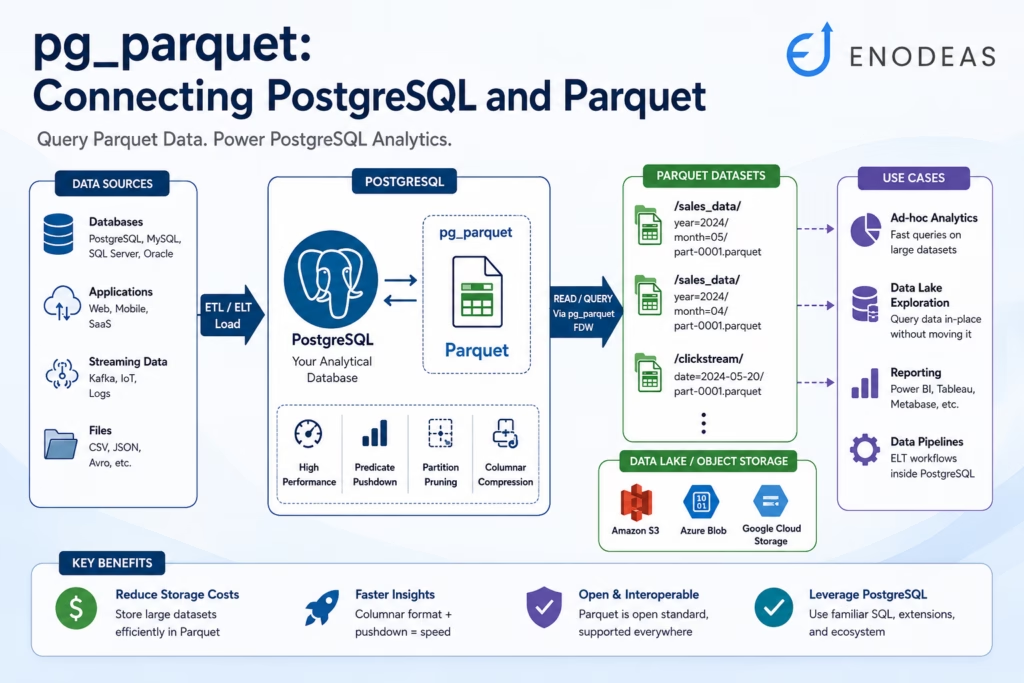
In today’s data-driven world, effectively managing and analyzing massive datasets isn’t just important—it’s essential. PostgreSQL is a powerful database, but how can it truly shine when faced with large data volumes often stored externally? This is where pg_parquet comes into play, bridging PostgreSQL with the efficiency of Apache Parquet files. This is a PostgreSQL extension.
You can use pg_parquet extension to read and write parquet files located in Amazon S3, Azure, Google Cloud or file system from PostgreSQL. You can leverage COPY TO/FROM commands to read and write Parquet files.
Our earlier article, Learn parquet_fdw laid the groundwork. It covered the essentials: setup, basic Parquet reads, and partitioning fundamentals. Now, we’re taking the next step. This guide explores three advanced patterns that leverage pg_parquet capabilities. These techniques can transform your PostgreSQL instance into a versatile analytical engine. And don’t worry, we won’t rehash the basics; we’re diving straight into powerful applications.
Let’s explore how pg_parquet can supercharge your data strategy.
Warm Archival: Striking the Balance Between Cost and Accessibility
Your primary PostgreSQL tables are growing fast. Keeping all that historical data “hot” means rise very fast storage bills and mounting maintenance headaches. Many teams offload older records to Parquet files to save costs. That’s smart. However, this often comes at a price: losing simple, direct SQL access to that archived data. What if you could have both cost savings and easy access?
With pg_parquet (often implemented via a Foreign Data Wrapper like parquet_fdw), you can achieve exactly that. Here’s the strategy:
- Archive Intelligently: First, extract older data (e.g., records older than ‘N’ days) using a simple script, perhaps with Python and PyArrow.
- Store Efficiently: Next, write this data to Parquet files, ideally organizing them into partitioned directories (like year=/month=) for better query performance.
- Expose Seamlessly: Then, create a foreign table in PostgreSQL using pg_parquet’s FDW capabilities. This table points directly to your Parquet archive directory. The beauty here is that directory-based partition pruning often kicks in, preventing unnecessary full scans of your archive.
- Unify Access: Finally, create a PostgreSQL view. This view uses UNION ALL to combine your live, “hot” data from the native PostgreSQL table with the “warm” archived data from the Parquet foreign table. You can even add a column to tag rows as “live” or “warm” for easier filtering.
Example Workflow in Action:
Let’s assume you run a Python script every night. This script is using pandas and PyArrow, dumps orders older than one year into a structured Parquet archive, say, at /tmp/archive/parquets/. (For a detailed script example, you can refer to our foundational article on parquet fdw).
Next, you define orders_archive as a foreign table using parque fdw, pointing to this archive.
Then, you create the unifying all_orders view in PostgreSQL:
CREATE OR REPLACE VIEW all_orders
AS
SELECT order_id, customer_id, order_date, total_amount, status, 'live' AS
       source
  FROM orders -- PostgreSQL table
UNION ALL
SELECT order_id, customer_id, order_date, total_amount, status, 'archive' AS
       source
FROM orders_archive; -- Your Parquet FDW tableNow, querying becomes straightforward:
SELECT *
  FROM all_orders
 WHERE order_date BETWEEN '2024-01-01'
                      AND '2024-12-31'
;PostgreSQL, with pg_parquet’s help, handles the rest. Parquet’s efficient columnar reads and the FDW’s predicate pushdown capabilities ensure that queries on archived data are still performant.
2. Querying Your Data Lake Directly from PostgreSQL
Data lakes, often hosted on S3, GCS, or Azure, store petabytes of data in Parquet format. This is a goldmine of information. Yet, analysts frequently resort to external query engines like Presto or Spark to tap into it. While powerful, these tools add another layer of operational complexity. Couldn’t PostgreSQL handle this directly?
Yes, it can! With pg_parquet and an appropriately configured FDW (like parquet_fdw supporting S3-compatible access or a dedicated S3 FDW), PostgreSQL can query Parquet files directly in your data lake.
- Configure Cloud Access: Set up your FDW to access your cloud storage. This often involves mapping Hive-style partitions (e.g., directory names like event_date=YYYY-MM-DD) to your Parquet directories.
- Define Foreign Tables: Expose your clickstream, IoT, or log datasets as foreign tables within PostgreSQL.
- Query Efficiently: Push down filters directly in your SQL. For instance, a WHERE event_date=’2025-05-20′ clause can instruct the FDW to only read data from relevant partitions/directories, drastically reducing data scanned.
Key Tip for Performance:
Predicate pushdown—where SQL WHERE clauses are passed to the Parquet reader—is your best friend here. It works most effectively with simple column filters. Be cautious with complex expressions in your WHERE clause, such as CAST(page_url AS text) LIKE ‘%/view%’. These might prevent pushdown, forcing the FDW to pull more data than necessary into PostgreSQL before filtering. It’s like a software bug where an unoptimized regular expression causes performance to plummet. Always test your queries with EXPLAIN to confirm that filters are being applied at the Parquet reading stage, not just within PostgreSQL’s planner after data retrieval.
3. Lightweight ELT Pipelines Inside PostgreSQL
Traditional ETL (Extract, Transform, Load) tools can sometimes feel like overkill for simpler transformations. Moreover, if your target is PostgreSQL, moving data out only to push it back in for transformation adds unnecessary hops and complexity.
Embrace ELT (Extract, Load, Transform) right within PostgreSQL, with pg_parquet facilitating the “Load” part from external Parquet sources.
- Stage Raw Data: Land your raw data as Parquet files, either locally or in cloud storage.
- Access via Foreign Table: Create a PostgreSQL foreign table using pg_parquet that points to this staging area.
- Transform with SQL: Use PostgreSQL’s powerful native SQL capabilities (or dbt models that compile to SQL) to transform this data. You can then load the results into final, native PostgreSQL tables.
- Schedule with Ease: Automate these transformation jobs using pg_cron for in-database scheduling or tools like Apache Airflow for broader workflow orchestration.
Illustration – Daily Sensor Data Summary:
Imagine raw sensor readings arrive daily and are stored in a partitioned Parquet location, like /staging/sensors/dr=YYYY-MM-DD.
First, define a raw_sensors foreign table using pg_parquet(e.g., via parquet_fdw) that includes a dt DATE column representing the partition.
Next, run a nightly SQL job to process and summarize this data:
INSERT INTO daily_sensor_summary (date, avg_temp, max_hum, sensors)
SELECT
    dt AS date,
    AVG(temp) AS avg_temp,
    MAX(humidity) AS max_hum,
    COUNT(DISTINCT sensor_id) AS sensors
FROM raw_sensors -- The FDW table pointing to Parquet files
WHERE dt = CURRENT_DATE - INTERVAL '1 day' -- Process yesterday's data
GROUP BY dt
ON CONFLICT (date) DO UPDATE -- If a summary for that date already exists
  SET avg_temp = EXCLUDED.avg_temp,
      max_hum  = EXCLUDED.max_hum,
      sensors  = EXCLUDED.sensors;
This approach cleverly uses PostgreSQL as the transformation engine, making your ELT process lean and efficient.
Advanced Performance Tips for pg_parquet
To truly harness the power of pg_parquet, keep these performance strategies in mind:
- Partition Strategically: This is crucial. Organize your Parquet files into directories based on columns you frequently filter on (e.g., date, region). Ensure your partitioning scheme mirrors your common query patterns. This allows the FDW to skip reading entire directories, leading to massive speedups.
- ANALYZE Your Foreign Tables: Just like with native tables, statistics matter. Regularly run ANALYZE your_foreign_table_name; (e.g., ANALYZE orders_archive;). This helps PostgreSQL’s query planner make smarter decisions, estimate join costs accurately, and choose optimal execution plans when dealing with these Parquet-backed tables.
- Monitor Predicate Pushdown: Don’t assume filters are always pushed down. Use EXPLAIN (VERBOSE) on your queries. Check the output to confirm that your WHERE clause conditions are being applied at the Parquet layer by the FDW, rather than after fetching all the data into PostgreSQL.
- Consider Selective Materialization: For very frequently accessed data subsets from your Parquet store, or when performing repeated heavy queries and complex joins against local tables, sometimes it’s best to materialize the results. You can do this by creating a native PostgreSQL MATERIALIZED VIEW or periodically using CREATE TABLE AS SELECT … (CTAS) from your foreign table.
Further Reading & Resources
To continue your journey with PostgreSQL and Parquet:
- Base Setup and FDW Details: pg_parquet: The Foreign Data Wrapper for PostgreSQL (Your internal link)
- Apache Parquet Format: Apache Parquet Documentation
- FDW Performance Insights: Search for tutorials like “PostgreSQL FDW Performance Techniques” on platforms like YouTube for deeper dives into SQL pushdown.
- dbt for ELT: Explore dbt Learn if you’re interested in managing SQL-based transformations.
By embracing these advanced patterns—warm archival, direct data lake querying, and in-database ELT—you effectively transform PostgreSQL. It evolves from primarily a transactional store into a unified, powerful analytic hub. The pg_parquet ecosystem provides the tools. We encourage you to explore these methods, adapt them to your unique challenges, and let pg_parquet elevate your entire data architecture.


Pingback: Learn Postgres parquet_fdw(Foreign Data Wrappers) in 10 Minutes