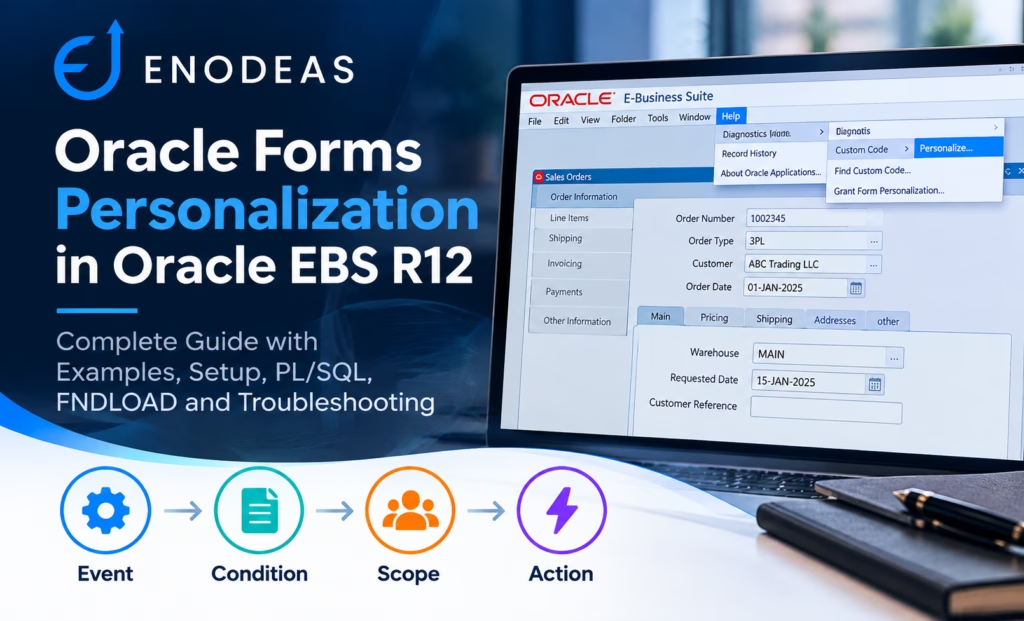
Form Personalization in Oracle Apps R12
Form Personalization is one of the most useful techniques for customizing the front end of Oracle Apps R12 without modifying the seeded Oracle Forms code.
If you work with Oracle Apps R12, you will eventually receive a requirement that sounds very small:
“Make this field mandatory.”
Or:
“Users should not be able to change this field.”
Or:
“Hide this field for a particular responsibility.”
At first, these requirements may look like they need a custom Oracle Forms change.
In many cases, they don’t.
Form personalization in Oracle Apps R12 provides a practical way to change the behavior of Oracle EBS Forms without modifying the seeded Oracle Forms source.
For example, suppose your Order Management team has this requirement:
For 3PL orders, users should not be allowed to manually change the Warehouse.
Instead of modifying the standard form, you can create a personalization that follows a simple rule:
User opens Order Line
        ↓
Check Order Type
        ↓
Is Order Type = 3PL?
     /          \
   Yes           No
    ↓             ↓
Disable       Do nothing
Warehouse
This is the basic idea behind Form Personalization.
In this guide, we will start with the fundamentals and then move into practical Oracle EBS R12 examples, PL/SQL, debugging, FNDLOAD migration, and real-world implementation considerations.
What Is Oracle Forms Personalization?
Form Personalization is an Oracle Apps R12 feature that allows you to change the behavior of Forms-based screens through configuration rather than directly modifying the standard form.
Oracle’s documentation describes personalization rules using concepts such as Events, Conditions, Scope, and Actions.
The easiest way to remember the concept is:
Event
  ↓
Condition
  ↓
Scope
  ↓
Action
  ↓
Result
For example:
Event:
User enters an Order Line

Condition:
Order Type = 3PL

Scope:
Specific Responsibility

Action:
Disable Warehouse

Result:
User cannot change Warehouse
Once you understand this pattern, Form Personalization becomes much easier to work with.
Why Use Form Personalization in Oracle Apps R12?
Oracle EBS implementations frequently need small front-end changes.
Some common requirements are:
- Make a field mandatory.
- Make a field read-only.
- Hide a field.
- Display a warning.
- Set a default value.
- Change a field property.
- Validate two fields together.
- Restrict behavior by responsibility.
- Restrict behavior by user.
- Execute a Forms built-in.
- Call custom PL/SQL logic.
Without Form Personalization, some of these requirements could lead to a more invasive customization.
Form Personalization gives you another option.
The important point is not that Form Personalization should be used for everything.
Instead:
Use Form Personalization when the requirement is primarily a front-end behavior that can be implemented cleanly through a personalization rule.
For complex business logic, a custom PL/SQL package or supported Oracle EBS API may be more appropriate.
How Does Form Personalization in Oracle Apps Work?
A personalization can be thought of as a small business rule attached to an Oracle EBS form.
Consider this requirement:
If the order is an Internal Order, make Customer Reference mandatory.
The logic becomes:
WHEN something happens
        ↓
Check Order Type
        ↓
If Order Type = Internal Order
        ↓
Make Customer Reference mandatory
Technically:
EVENT
WHEN-NEW-ITEM-INSTANCE
        ↓
CONDITION
Order Type = Internal Order
        ↓
ACTION
Customer Reference.REQUIRED = TRUE
This Event → Condition → Action model is the foundation of most Form Personalization work.
The Four Important Parts of Form Personalization
Before creating a personalization, understand these four concepts.
1. Event
The event tells Oracle Forms:
“When should this rule be evaluated?”
Examples include:
WHEN-NEW-FORM-INSTANCEWHEN-NEW-BLOCK-INSTANCEWHEN-NEW-RECORD-INSTANCEWHEN-NEW-ITEM-INSTANCEWHEN-VALIDATE-ITEMWHEN-VALIDATE-RECORD
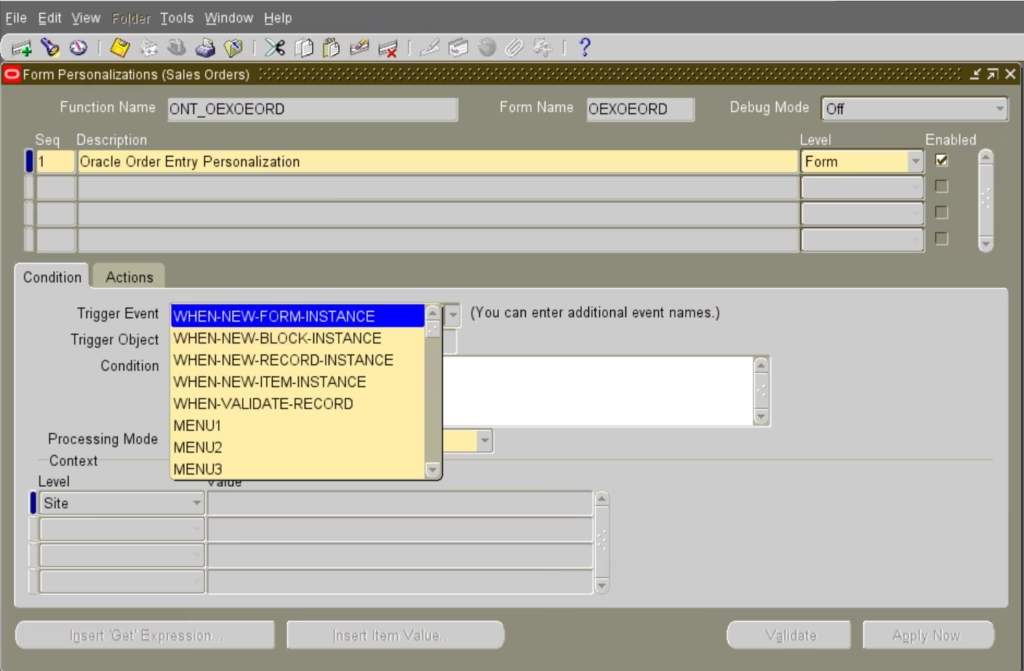
Choosing the correct event is one of the most important parts of personalization.
A common problem is:
“My condition is correct, but nothing happens.”
Very often, the first thing to check is the event.
2. Condition
The condition tells Oracle Forms:
“When should the action execute?”
A simple condition could be:
:ORDER.ORDER_TYPE = '3PL'A more complex condition could be:
:LINE.ORDERED_QUANTITY > 100
AND
NVL(:LINE.WAREHOUSE_CODE, 'X') <> 'MAIN'
The condition acts as the filter for your personalization.
3. Scope
Scope answers:
“Who should this personalization affect?”
Depending on the requirement, the rule may be applicable to:
- Site
- Responsibility
- User
- Other supported contexts
For example:
All Users
    ↓
Form Personalization

OR

Specific Responsibility
    ↓
Form Personalization

OR

Specific User
    ↓
Form Personalization
This is very useful in large Oracle EBS environments where the same form is used by multiple business teams.
4. Action
The action answers:
“What should happen when the condition is true?”
Common actions include:
- Change a property.
- Display a message.
- Execute a Forms built-in.
- Execute PL/SQL.
- Add or enable appropriate functionality supported by the form.
For example:
Property:
UPDATE_ALLOWED

Value:
FALSE
How to Enable Form Personalization in Oracle Apps R12
One of the most common questions is:
How do I enable Form Personalization in Oracle Apps R12?
First, open the required Oracle EBS form.
Then navigate to:
Help → Diagnostics → Custom Code → Personalize
The availability of diagnostics and personalization can depend on the Oracle EBS configuration and user privileges.
If the Personalize option is not available, check your environment’s Utilities Diagnostics profile(Utilities:Diagnostics) configuration and access.

Once the Personalization window opens, you can query existing rules or create a new rule.
Before Creating a New Personalization
There is one practical step that is easy to overlook.
Check whether the requirement has already been implemented.
In a large Oracle EBS environment, you may find several existing personalization for the same form.
For example:
Sales Order Form

Rule 10 → Disable field
Rule 20 → Set default
Rule 30 → Display warning
Rule 40 → Enable field
Creating another rule without understanding the existing rules can produce unexpected behavior.
So before creating a new personalization, check:
- Existing rules
- Event
- Sequence
- Scope
- Condition
- Target item
- Action
This can save a lot of debugging later.
Oracle Forms Personalization Example 1: Make a Field Mandatory
Let’s start with a simple requirement.
Requirement
Customer Reference must be mandatory for Internal Orders.
Step 1 – Identify the event
For example:
WHEN-NEW-ITEM-INSTANCEThe exact event should depend on when the field property needs to change.
Step 2 – Define the condition
:ORDER.ORDER_TYPE = 'Internal Order'Step 3 – Define the action
Set the appropriate property:
REQUIRED = TRUEThe complete logic is:
User enters Customer Reference
            ↓
Check Order Type
            ↓
Internal Order?
        /       \
      Yes        No
       ↓          ↓
  Required     Normal
Important point
Don’t simply choose an event because it sounds logical.
Ask:
At exactly what point does the property need to change?
That determines the correct event.
Example 2: Disable a Field in Oracle EBS
This is one of the most common Form Personalization requirements.
Requirement
Users should not be able to modify Unit Price for Internal Orders.
The condition could be:
:ORDER.ORDER_TYPE = 'Internal Order'The action changes the appropriate item property:
UPDATE_ALLOWED = FALSEThe result:
Internal Order
      ↓
Unit Price
      ↓
UPDATE_ALLOWED = FALSE
      ↓
User cannot modify Unit Price
This is a good example of a requirement that can often be solved without modifying the standard form.
Example 3: Hide a Field
Suppose a field is not relevant to users working under a particular responsibility.
The personalization can change the appropriate display property.
The logic becomes:
Responsibility A
      ↓
Field visible

Responsibility B
      ↓
Field hidden
This can make a complex Oracle EBS form easier for users to work with.
However, remember:
Hiding a field is a user-interface change, not necessarily a security control.
If the underlying business rule is important, enforce it at the appropriate business/application layer as well.
Example 4: Change a Field Prompt
This is a simple but useful personalization.
Suppose the standard form displays:
Shipment Datebut your business users prefer:
Dispatch DateIf the relevant Forms item property supports changing the prompt, Form Personalization can be used to change the displayed label.
This is a good example of using personalization to improve the user experience without changing the underlying database column.
Example 5: Set a Default Value
Suppose the requirement is:
When a new record is created, default Attribute1 to DEFAULT.
The logic could be:
:BLOCK.ATTRIBUTE1 := 'DEFAULT';This looks simple, but there is an important consideration.
What happens if the user changes the value?
If the personalization runs again, it could overwrite the user’s change.
Therefore, always ask:
Should the default be applied once, or every time the record becomes active?
This question helps determine the correct event and condition.
Example 6: Display a Message
Sometimes the business requirement is simply to warn or inform the user.
For example:
Please verify the requested delivery date before saving the order.
A message-based personalization is ideal for this type of requirement.
It can also be extremely useful during development.
Suppose your personalization does not appear to work.
Temporarily change the action to a simple message:
Form Personalization triggered.If the message appears, you know that the event and condition are being reached.
Then you can replace the message with the actual action.
This is a very simple debugging technique, but it can save considerable time.
Example 7: Validate Multiple Fields
Now let’s look at a slightly more realistic business rule.
Requirement
If Ordered Quantity is greater than 100, Warehouse must be MAIN.
The condition could be:
:LINE.ORDERED_QUANTITY > 100
AND
NVL(:LINE.WAREHOUSE_CODE, 'X') <> 'MAIN'
The action can display:
For quantities above 100, Warehouse must be MAIN.The logic is:
Quantity entered
       ↓
Quantity > 100?
    /       \
  No         Yes
  ↓           ↓
Continue   Warehouse = MAIN?
              /      \
            Yes       No
             ↓         ↓
          Continue   Message
This is where Form Personalization becomes more than a simple field-property tool.
Example 8: Execute PL/SQL from Form Personalization
Oracle EBS technical consultants often need to go one step further.
Suppose you already have a custom package:
XXOM_ORDER_UTIL_PKGwith a procedure:
PROCEDURE validate_order (
    p_order_id IN NUMBER
);
You could use Form Personalization to invoke the procedure.
For example:
BEGIN
    xxom_order_util_pkg.validate_order(
        p_order_id => :ORDER.HEADER_ID
    );
END;
The important design principle is:
Keep the personalization small.
Don’t put a large amount of business logic directly into the personalization.
Instead:
Oracle EBS Form
       ↓
Form Personalization
       ↓
Custom PL/SQL Package
       ↓
Business Logic
       ↓
Oracle EBS API / Database
This makes the solution much easier to maintain.
When Should You Use a Custom PL/SQL Package?
Suppose your personalization starts looking like this:
100+ lines of SQL
50+ lines of PL/SQL
Multiple validations
Several exception handlers
Multiple database queries
That is a warning sign.
Move the logic into a custom package.
For example:
XXOM_ORDER_UTIL_PKGThen let Form Personalization simply call the appropriate procedure or function.
This gives you separation between:
User Interface Logic
and
Business Logic
That separation becomes increasingly important as the Oracle EBS implementation grows.
Real-World Example: Disable Warehouse for 3PL Orders
Let’s take a requirement that you might actually receive in an Oracle EBS project.
Business requirement
For 3PL orders, users should not manually change the Warehouse.
Start by identifying:
- Form
- Block
- Warehouse item
- Order Type item
- Appropriate event
Then design the rule.
Event
For example:
WHEN-NEW-RECORD-INSTANCECondition
Conceptually:
Order Type = 3PLAction
Warehouse.UPDATE_ALLOWED = FALSEThe final design becomes:
                 Order Line
                     |
                     ↓
        WHEN-NEW-RECORD-INSTANCE
                     |
                     ↓
             Check Order Type
                     |
             +-------+-------+
             |               |
           3PL             Other
             |               |
             ↓               ↓
       Disable            No Change
       Warehouse
Now test the opposite case
A common testing mistake is to verify only the 3PL scenario.
You should also test:
3PL Order
    → Warehouse disabled

Standard Order
    → Warehouse editable
Both scenarios are part of the requirement.
Form Personalization Events: Which One Should I Use?
There is no single event that is always correct.
The event depends on when the rule needs to be evaluated.
| Event | Typical use |
|---|---|
| WHEN-NEW-FORM-INSTANCE | Initial form behavior |
| WHEN-NEW-BLOCK-INSTANCE | Entering a block |
| WHEN-NEW-RECORD-INSTANCE | Record-level behavior |
| WHEN-NEW-ITEM-INSTANCE | Entering an item |
| WHEN-VALIDATE-ITEM | Item validation |
| WHEN-VALIDATE-RECORD | Record validation |
A practical way to choose
Ask:
“At what point would a user expect this rule to take effect?”
If the answer is:
When the form opens
look at form initialization events.
If the answer is:
When the user enters a record
look at record-level events.
If the answer is:
When the user validates a value
look at validation events.
This simple approach makes event selection much easier.
Oracle Forms Personalization vs CUSTOM.pll
Another common question is:
Should I use Form Personalization or CUSTOM.pll?
The answer depends on the requirement.
| Requirement | Possible approach |
|---|---|
| Make field mandatory | Form Personalization |
| Disable field | Form Personalization |
| Hide field | Form Personalization |
| Simple message | Form Personalization |
| Simple validation | Form Personalization |
| Complex Forms event handling | CUSTOM.pll / appropriate customization |
| Reusable business logic | Custom PL/SQL package |
| EBS transaction processing | Supported EBS API/package |
The key is not to select the most powerful technology.
Select the simplest maintainable solution that satisfies the requirement.
How to Troubleshoot Oracle Form Personalization
One of the most frustrating situations is:
“The personalization is there, but it doesn’t work.”
Don’t immediately rewrite the condition.
Troubleshoot it step by step.
Step 1 – Is the rule enabled?
Check the rule status.
Step 2 – Is the event correct?
Ask:
Does this event actually occur when I expect it to?
This is often the first thing to investigate.
Step 3 – Is the item reference correct?
Verify the technical Forms item.
For example:
BLOCK.ITEMThe label shown to the user may not be the actual Forms item name.
Step 4 – Is the condition using the correct value?
This is particularly important in Oracle EBS.
A field may display:
3PL Orderwhile the underlying Forms item contains an ID.
Don’t assume the displayed value is the value available to your condition.
Step 5 – Check the scope
If the rule works for one responsibility but not another, inspect the scope.
Step 6 – Check sequence
Multiple personalizations may affect the same item.
For example:
Rule 10
UPDATE_ALLOWED = FALSE

Rule 20
UPDATE_ALLOWED = TRUE
The final behavior depends on the rules that execute.
A Useful Debugging Technique
When debugging a complex personalization, simplify it.
Instead of:
Complex condition
       ↓
Complex PL/SQL
       ↓
Property change
temporarily use:
Simple condition
       ↓
Message
For example:
Condition = TRUE

Message:
Personalization reached this point.
If the message appears, add the complexity back one piece at a time.
This is essentially the same approach we use when debugging a PL/SQL package or Python module:
Reduce the problem until you know which layer is failing.
How to Move Form Personalization from DEV to UAT
Creating a personalization in DEV is only part of the job. Eventually you need to move it to another environment.
Oracle EBS implementations commonly use FNDLOAD for migration of application configuration.
For Form Personalization, affrmcus.lct and the relevant Form Personalization configuration are commonly used in FNDLOAD-based migration.
A typical pattern is:
FNDLOAD apps/apps 0 Y DOWNLOAD \
$FND_TOP/patch/115/import/affrmcus.lct \
xx_form_personalization.ldt \
FND_FORM_CUSTOM_RULES
Then upload the generated LDT in the target environment:
FNDLOAD apps/apps 0 Y UPLOAD \
$FND_TOP/patch/115/import/affrmcus.lct \
xx_form_personalization.ldt
Use the exact command appropriate for your Oracle EBS release, environment, and migration process.
Important
Don’t treat an LDT file as a substitute for testing.
After migration, verify:
- Form
- Function
- Event
- Condition
- Scope
- Action
- Sequence
- Enabled status
Common Form Personalization Mistakes
1. Wrong Event
The condition is correct but the rule never executes.
Solution: Check the event first.
2. Wrong Item Name
The user sees “Warehouse”, but the actual Forms item has a different technical name.
Solution: Verify the actual block and item.
3. Using Display Value Instead of Actual Value
The form displays a description but stores an ID.
Solution: Check the actual runtime value.
4. Personalization Applied to the Wrong Responsibility
Solution: Review scope.
5. Default Value Gets Overwritten
Solution: Review when the rule fires.
6. Multiple Personalizations Conflict
Solution: Review sequence and existing rules.
7. Too Much PL/SQL
Solution: Move complex logic into a custom package.
Form Personalization Best Practices
After working with Oracle EBS for some time, a few practices become particularly useful.
Keep the Rule Simple
A good personalization should be easy to understand.
For example:
XXOM_DISABLE_WAREHOUSE_3PLis much better than:
TEST_RULE_1Use Meaningful Names
A naming convention such as:
XXOM_DISABLE_WAREHOUSE_3PL
XXOM_REQUIRE_CUSTOMER_REFERENCE
XXINV_DEFAULT_SUBINVENTORY
XXPO_VALIDATE_VENDOR_SITE
makes support much easier.
Avoid Unnecessary SQL
Remember that a personalization can execute during user interaction.
Unnecessary database queries can affect the user experience.
Use values already available in the form wherever practical.
Document Why the Rule Exists
Don’t document only:
“Disables Warehouse.”
Document the business requirement:
“Warehouse must not be manually changed for 3PL orders because the warehouse is determined by the 3PL fulfillment process.”
That explanation will be much more useful six months later.
Form Personalization Checklist
Before moving a rule to production, check:
Configuration
- Correct form
- Correct block
- Correct item
- Correct event
- Correct condition
- Correct scope
- Correct action
- Correct sequence
- Rule enabled
Testing
- Positive scenario
- Negative scenario
- New record
- Existing record
- Different users
- Different responsibilities
- Different organizations
- Save
- Cancel
- Re-query
Documentation
Record:
- Personalization name
- Form
- Function
- Event
- Condition
- Scope
- Action
- Business requirement
- Developer/owner
- Change request
- Date
- Migration information
Form Personalization Learning Roadmap
If you are new to Oracle Forms Personalization, don’t try to learn everything in one day.
Follow this sequence.
Level 1 – Oracle Forms Basics
Learn:
- Forms
- Blocks
- Items
- Records
- Triggers
- System variables
Level 2 – Basic Personalization
Create these five examples:
- Display a message.
- Hide a field.
- Disable a field.
- Make a field mandatory.
- Set a default value.
Level 3 – Conditions
Learn:
- Item comparisons
- AND
- OR
- Profile values
- User context
- Responsibility context
- Organization context
Level 4 – Events
Practice:
WHEN-NEW-FORM-INSTANCEWHEN-NEW-BLOCK-INSTANCEWHEN-NEW-RECORD-INSTANCEWHEN-NEW-ITEM-INSTANCEWHEN-VALIDATE-ITEMWHEN-VALIDATE-RECORD
Level 5 – PL/SQL
Move from:
Personalizationto:
Personalization
       ↓
Custom Function
       ↓
Custom Package
       ↓
EBS API
Level 6 – Production
Finally learn:
- Rule sequencing
- Scope
- FNDLOAD
- Debugging
- Documentation
- Performance
- Migration
- Troubleshooting conflicting rules
Frequently Asked Questions
What is Form Personalization in Oracle EBS?
Form Personalization is a configuration-based mechanism for changing the behavior of Oracle EBS Forms using events, conditions, scope, and actions.
How do I enable Form Personalization in Oracle Apps R12?
Open the required form and navigate to:
Help → Diagnostics → Custom Code → Personalize
The availability of this functionality depends on your EBS configuration and user access.
Can I make a field mandatory using Form Personalization?
Yes. You can use an appropriate event and condition and change the relevant item property.
Can I disable a field using Form Personalization?
Yes. A property action can be used to control whether an item can be updated, where supported.
Can I hide a field?
Yes, where the relevant Forms item property supports the required behavior.
Can I call PL/SQL from Form Personalization?
Yes. For substantial business logic, it is generally better to call a custom PL/SQL package rather than place large amounts of code directly in the personalization.
Can I migrate Form Personalization using FNDLOAD?
Form Personalization configuration can be migrated using the appropriate Oracle EBS FNDLOAD configuration and loader file.
Why is my Form Personalization not working?
Start by checking:
- Event
- Condition
- Scope
- Item name
- Sequence
- Existing conflicting personalizations
What is the difference between Form Personalization and CUSTOM.pll?
Form Personalization is primarily configuration-driven. CUSTOM.pll provides a broader Forms extension mechanism. The appropriate choice depends on the complexity and scope of the requirement.
Conclusion
Oracle Forms Personalization is one of those Oracle EBS features that looks simple at first but becomes extremely useful once you understand how to apply it properly.
The basic idea is:
Event
  ↓
Condition
  ↓
Scope
  ↓
Action
From this simple pattern, you can implement many common requirements:
- Make fields mandatory.
- Disable fields.
- Hide fields.
- Set defaults.
- Display messages.
- Validate user input.
- Execute Forms built-ins.
- Call custom PL/SQL.
- Apply rules by responsibility or user.
The most important lesson is not to use Form Personalization for everything.
Use it where it fits naturally.
For a small front-end requirement, it can be a clean and maintainable solution.
For complex business logic, keep the personalization thin and move the actual processing into a custom PL/SQL package or supported Oracle EBS API.
A good Oracle EBS customization therefore often looks like this:
                 Oracle EBS Form
                       |
                       ↓
             Form Personalization
                       |
                       ↓
              Custom PL/SQL Package
                       |
                       ↓
              Oracle EBS API / Logic
                       |
                       ↓
                    Database
Once you start thinking in this way, Form Personalization stops being just a collection of configuration screens and becomes a useful part of your Oracle EBS customization toolkit.