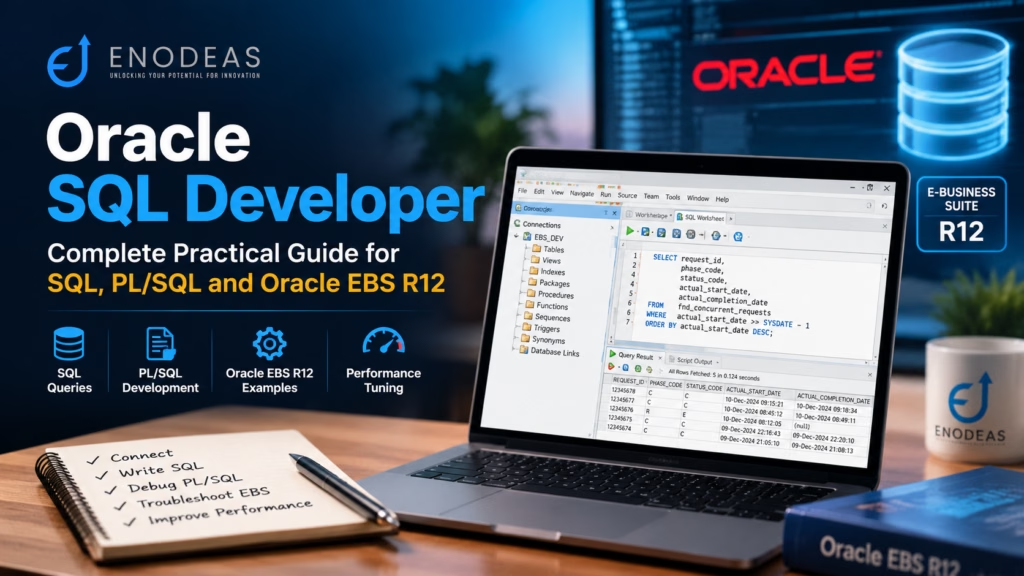
Oracle SQL Developer: SQL & PL/SQL Guide
If you work with Oracle Database, you probably spend a good part of your day writing SQL queries, checking table structures, debugging PL/SQL code, or investigating why a process is taking longer than expected. The right development tool like Oracle SQL Developer can make these tasks easier and help you work more confidently.
Oracle SQL Developer is a graphical database development tool that lets you write and execute SQL, develop PL/SQL, browse database objects, export query results, and review execution plans from one interface. It is especially useful when you need to move between writing code and investigating data.
For Oracle E-Business Suite (EBS) R12 developers, SQL Developer can be a practical part of daily support and development work. When a concurrent request fails, an interface rejects records, or an order does not progress as expected, you can use it to examine the relevant database records and narrow down the cause.
This guide covers the features developers actually use, from creating a connection and running SQL to debugging PL/SQL, investigating Oracle EBS issues, and analyzing query performance. The examples are intended for learning and diagnosis; always use an authorized environment and follow your organization’s change-control procedures.
Download the Oracle SQL Developer Practical Guide
Want to keep this tutorial handy? Download the free Enodeas PDF guide covering Oracle SQL Developer, SQL queries, PL/SQL development, debugging and Oracle EBS troubleshooting.
Published by Enodeas | enodeas.com
Table of Contents
- 1. What Is Oracle SQL Developer?
- 2. Key Features of Oracle SQL Developer
- 3. Download and Install SQL Developer
- 4. Create an Oracle Database Connection
- 5. Work with the SQL Worksheet
- 6. Explore Database Objects
- 7. Develop and Debug PL/SQL
- 8. Use SQL Developer with Oracle EBS R12
- 9. Analyze SQL Performance
- 10. Import and Export Data
- 11. Common Errors and Troubleshooting
- 12. SQL Developer vs. SQL*Plus vs. SQLcl
- 13. Best Practices
- 14. Frequently Asked Questions
- 15. Conclusion
1. What Is Oracle SQL Developer?
Oracle SQL Developer is an integrated development environment (IDE) for working with Oracle Database. It provides a graphical workspace for writing SQL statements, developing PL/SQL programs, viewing database objects, and examining query results.
Imagine that a user reports a failed Oracle EBS concurrent request. You may need to check its status, inspect related records, review a custom package, and run a few diagnostic queries. SQL Developer lets you perform much of this investigation from the same application.
You can download the desktop application from the official Oracle SQL Developer website. Check the documentation for your chosen release because installation and Java requirements can differ by version.
1.1 Why Do Oracle Developers Use SQL Developer?
SQL Developer is useful for more than running SELECT statements. Developers commonly use it to:
- Write and execute SQL: Filter records, join tables, aggregate data, and validate results.
- Develop PL/SQL: Create and maintain procedures, functions, packages, and triggers.
- Browse database objects: Inspect tables, views, indexes, constraints, and other objects visible to your account.
- Debug programs: Set breakpoints and inspect variable values during a supported debugging session.
- Export results: Save query output for reconciliation, reporting, or further analysis.
- Investigate performance: Display execution plans and review available SQL statistics.
If you are new to the tool, begin with database connections and the SQL Worksheet. Once those are familiar, move on to PL/SQL debugging and execution plans. Learning features in this order gives you a useful foundation without making the first steps unnecessarily complicated.
2. Key Features of Oracle SQL Developer
SQL Developer brings several everyday database tasks into one interface. These are the features worth learning first.
2.1 SQL Worksheet
The SQL Worksheet is where you write and execute SQL statements. For example, this query lists concurrent requests that started during the last 24 hours:
SELECT request_id,
       phase_code,
       status_code,
       actual_start_date,
       actual_completion_date
FROM   fnd_concurrent_requests
WHERE  actual_start_date >= SYSDATE - 1
ORDER BY actual_start_date DESC;This is a starting point for reviewing recent request activity. You can add filters for a specific request ID or program after confirming which records are relevant. The query assumes that your account can access the Oracle EBS table.
2.2 Database Object Browser
The Connections navigator lets you browse database objects that your account is allowed to see. You can open a table to review its columns or inspect a package specification and body without first writing a dictionary query.
- Tables and views
- Indexes and constraints
- Sequences and synonyms
- Procedures and functions
- Packages and package bodies
- Triggers and other supported objects
For Oracle EBS developers, this is helpful when working with seeded tables, custom packages, and interface programs. You still need to verify the data model and business process before relying on an object in a report or customization.
2.3 PL/SQL Editor and Debugger
SQL Developer supports PL/SQL development and debugging. If a custom package returns an unexpected value, you can set a breakpoint and step through the code rather than adding temporary output statements everywhere.
Debugging generally involves opening the program unit, setting a breakpoint, starting a debugging session with suitable parameter values, stepping through the statements, and inspecting variables. Debugging may require additional privileges and database configuration.
2.4 Execution Plans and Data Export
The Explain Plan feature displays the operations Oracle expects to use for a SQL statement. This can help you investigate table access, joins, filters, and sorting. SQL Developer also provides export options for saving query results in formats such as CSV. The available options depend on the installed release and the type of data being exported.
3. Download and Install SQL Developer
3.1 Download the Correct Release
Visit the official Oracle SQL Developer download page and select the distribution for your operating system. Review the release-specific system requirements and Java prerequisites. Some distributions include a suitable Java runtime, while others require a compatible JDK.
3.2 Launch the Application
Follow the installation instructions included with the package. After launching SQL Developer, locate the Connections panel. This is where you create and manage saved database connections.
A practical tip: use clear names for development, test, UAT, and production connections. Before running an INSERT, UPDATE, or DELETE statement, confirm the active connection. This small habit can prevent changes being made in the wrong environment.
4. Create an Oracle Database Connection
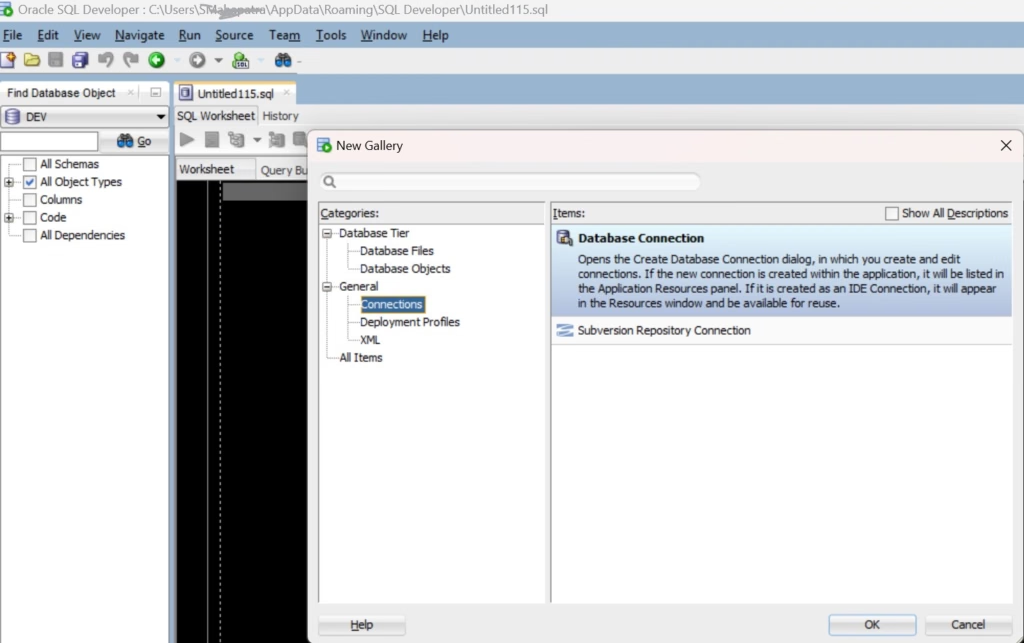
To connect to a database, you will usually need the hostname, listener port, service name or SID, and an authorized username and password. Your organization may also require a wallet, certificate, VPN, or another approved network configuration.
4.1 Enter the Connection Details
- Open SQL Developer and create a new connection from the Connections panel.
- Enter a descriptive connection name and your authorized database credentials.
- Select the Basic connection type if it matches your environment.
- Enter the hostname, port, and service name.
- Click Test. If the test succeeds, save the connection and connect.
The values below are examples only. Replace them with the details supplied by your DBA.
| Field | Example | Purpose |
|---|---|---|
| Connection Name | EBS_DEV | Identifies the saved connection |
| Username | DEV_USER | Authorized database account |
| Hostname | dbdev.example.com | Database server |
| Port | 1521 | Listener port, if configured |
| Service Name | devdb.example.com | Target database service |
4.2 Verify the Connected Database
After connecting, run this query to confirm the database session context:
SELECT USER AS connected_user,
       SYS_CONTEXT('USERENV', 'DB_NAME') AS database_name,
       SYS_CONTEXT('USERENV', 'SERVICE_NAME') AS service_name
FROM dual;The result shows the authenticated user and the database and service context. This is especially useful when you work across several Oracle EBS environments.
The authenticated user and current schema are not always the same. To check both, run:
SELECT USER AS authenticated_user,
       SYS_CONTEXT('USERENV', 'CURRENT_SCHEMA') AS current_schema
FROM dual;This can help explain why an unqualified object name resolves differently than expected. Changing the current schema does not grant additional privileges; the session still needs permission to access the object.
5. Work with the SQL Worksheet
5.1 Use Bind Variables
Suppose you need to investigate one concurrent request. Instead of editing the request ID in the SQL text every time, use a bind variable:
SELECT request_id,
       phase_code,
       status_code,
       requested_start_date,
       actual_start_date,
       actual_completion_date
FROM   fnd_concurrent_requests
WHERE request_id = :request_id;The :request_id variable allows you to supply the value when the statement is executed. Bind variables make queries easier to reuse and can reduce unnecessary hard parsing when SQL statements are repeatedly executed with different values.
5.2 Know When to Run a Statement or a Script
SQL Developer offers different execution modes. Use Run Statement for an individual SQL statement and Run Script for scripts containing multiple statements or script-oriented commands. For example, a script using SET SERVEROUTPUT ON and a slash terminator is generally better suited to Run Script.
SET SERVEROUTPUT ON;

DECLARE
    l_message VARCHAR2(100);
BEGIN
    l_message := 'Hello from Oracle SQL Developer';
    DBMS_OUTPUT.PUT_LINE(l_message);
END;
/Use the Script Output panel to view the output from this example. For other execution workflows, you may need to enable or configure the DBMS Output panel.
5.3 Be Careful with DML and Transactions
Before executing an UPDATE or DELETE statement, verify the table, filter condition, current connection, and expected number of affected rows. In a controlled test environment, you can review changes and roll back an uncommitted transaction if necessary. After a commit, an ordinary rollback cannot undo that transaction.
For Oracle EBS seeded transactional tables, do not use direct DML as a substitute for supported application processing. Use the appropriate public APIs, open interfaces, or application programs for transactional changes.
6. Explore Database Objects
6.1 Find Table Columns
When a query fails with an invalid identifier, check the actual table or view definition before changing the SQL. You can use the object browser or query the data dictionary:
SELECT column_id,
       column_name,
       data_type,
       data_length,
       nullable
FROM   all_tab_columns
WHERE  owner = UPPER(:owner)
AND    table_name = UPPER(:table_name)
ORDER BY column_id;ALL_TAB_COLUMNS shows column metadata for tables and views accessible to the current user. The owner and table name should be supplied in the expected uppercase format for ordinary unquoted object names.
6.2 Search for Database Objects
If you know part of a procedure or package name, search the accessible object metadata:
SELECT owner,
       object_name,
       object_type,
       status
FROM   all_objects
WHERE  UPPER(object_name) LIKE UPPER(:object_name_pattern)
ORDER BY owner, object_type, object_name;For example, you can provide a pattern such as XX%ORDER% to look for custom objects whose names contain relevant terms. Results depend on your account privileges and the objects visible to it.
6.3 Inspect Package Source
To review the source of an accessible package body, use ALL_SOURCE:
SELECT line,
       text
FROM   all_source
WHERE  owner = UPPER(:owner)
AND    name = UPPER(:package_name)
AND    type = 'PACKAGE BODY'
ORDER BY line;The package specification and package body are separate objects. Review the specification to understand the public procedures and parameters, and the body to understand their implementation. For EBS table definitions and dependencies, see the Oracle eTRM guide.
7. Develop and Debug PL/SQL
7.1 Create a Diagnostic Procedure
The following example retrieves the status of an Oracle EBS concurrent request. It demonstrates a simple SELECT INTO statement and exception handling.
CREATE OR REPLACE PROCEDURE xx_check_request (
    p_request_id IN NUMBER
)
AS
    l_status fnd_concurrent_requests.status_code%TYPE;
BEGIN
    SELECT status_code
    INTO   l_status
    FROM   fnd_concurrent_requests
    WHERE  request_id = p_request_id;

    DBMS_OUTPUT.PUT_LINE(
        'Request ID: ' || p_request_id ||
        ', Status: ' || l_status
    );
EXCEPTION
    WHEN NO_DATA_FOUND THEN
        DBMS_OUTPUT.PUT_LINE(
            'No accessible request found for ID: ' ||
            p_request_id
        );
END xx_check_request;
/This example assumes that the compilation schema can access the EBS table and resolve the object reference. In a real implementation, follow your organization’s schema, grants, naming, and logging standards. Do not deploy an ad hoc diagnostic procedure into production without approval.
7.2 Check Compilation Errors
If compilation fails, inspect the error details instead of guessing at the cause:
SELECT line,
       position,
       text
FROM   user_errors
WHERE  name = UPPER(:object_name)
ORDER BY sequence;This query checks errors for program units owned by the connected user. When investigating another schema, use the relevant accessible dictionary view and ensure you have permission to see the object and its errors.
Common causes include incorrect parameter types, missing declarations, invalid column names, missing privileges, and references to package members that are not declared in the visible specification.
7.3 Debug a PL/SQL Program
When code compiles but returns an unexpected result, debugging helps you follow the execution path and inspect variable values at the point where the result changes.
- Open the procedure or package body.
- Set a breakpoint at the relevant executable statement.
- Compile with debugging information if the environment requires it.
- Start the debugging session with suitable input values.
- Step through the code and inspect variables.
- Compare actual values with the expected result and identify the point of divergence.
For example, if a custom routine calculates a BOM allocation quantity incorrectly, inspect the input quantity, component quantity, parent-line reference, and calculated result at the relevant statements. Debugging requires suitable privileges and database configuration, so use an authorized environment.
8. Use SQL Developer with Oracle EBS R12
SQL Developer becomes most useful when you connect database investigation to the EBS business process. A failed request, a rejected interface record, and an order that has not been invoiced may require different diagnostic paths.
8.1 Troubleshoot a Concurrent Request
Start by checking the request status and available log and output references:
SELECT request_id,
       phase_code,
       status_code,
       requested_start_date,
       actual_start_date,
       actual_completion_date,
       logfile_name,
       outfile_name
FROM   fnd_concurrent_requests
WHERE request_id = :request_id;Use the result to establish the request’s state, then review its log, parameters, error messages, and dependencies. The table’s file-name columns may contain paths or references that must be interpreted in the context of your EBS environment.
For related topics, see Concurrent Manager in Oracle EBS R12 and the relevant concurrent program tutorials.
8.2 Investigate an Order in Order Management
Suppose a user reports that a sales order is booked but has not progressed as expected. Start by checking the order header:
SELECT header_id,
       order_number,
       org_id,
       ordered_date,
       flow_status_code
FROM   oe_order_headers_all
WHERE order_number = :order_number;Then review the associated lines:
SELECT line_id,
       header_id,
       line_number,
       shipment_number,
       ordered_item,
       ordered_quantity,
       flow_status_code
FROM   oe_order_lines_all
WHERE  header_id = :header_id
ORDER BY line_number, shipment_number;These queries establish the header and line status, but they do not explain every possible order-processing issue. If the order is not booked, review booking and validation errors. If it is booked but not shipped, investigate pick release and shipping execution. Otherwise if it is shipped but not invoiced, review the relevant Receivables interface and AutoInvoice processing.
8.3 Investigate Interface Errors
For an interface issue, trace the record from the source transaction to the staging or interface table, then to the import program and resulting application record.
- Identify the source transaction or external reference.
- Find the related staging or interface record.
- Review its processing status and error message.
- Check the concurrent request that processes the interface.
- Determine whether the record was imported, rejected, or left pending.
- Correct the root cause and reprocess using the supported application process.
Do not assume that changing a status flag is enough to reprocess a record. Import programs may depend on validations, control records, and application APIs. Directly updating seeded transactional tables can bypass application logic and leave related data inconsistent.
9. Analyze SQL Performance
A query can return the correct result and still be too slow for practical use. SQL Developer helps you inspect the optimizer’s plan and investigate the SQL that may be contributing to the delay.
9.1 Display an Execution Plan
Consider a query that retrieves an order by its order number:
SELECT header_id,
       order_number,
       ordered_date,
       flow_status_code
FROM   oe_order_headers_all
WHERE order_number = :order_number;Use Explain Plan in SQL Developer to display the planned operations. Review table access, index access, joins, filters, estimated rows, and optimizer cost. A full table scan is not automatically a problem; it may be appropriate when Oracle expects to read a large part of a table.
9.2 Review Available SQL Statistics
If your account has permission to query the relevant dynamic performance views, V$SQLSTATS can help identify statements with high accumulated elapsed time or logical I/O.
SELECT sql_id,
       executions,
       ROUND(elapsed_time / 1000000, 2) AS elapsed_seconds,
       ROUND(cpu_time / 1000000, 2) AS cpu_seconds,
       buffer_gets,
       disk_reads
FROM   v$sqlstats
WHERE  executions > 0
ORDER BY elapsed_time DESC
FETCH FIRST 20 ROWS ONLY;This ranks the SQL statistics currently available by accumulated elapsed time. It is not a complete historical report of every statement ever executed. A statement with high total elapsed time may simply run very frequently, so compare execution counts, average duration, CPU time, logical reads, and workload context before deciding what to tune.
9.3 Investigate a Slow Concurrent Program
For a long-running EBS request, first confirm that it is still running. Where privileges and diagnostic configuration permit, identify the related database session and current SQL, then inspect the plan and runtime evidence.
- Check whether the statement reads more rows than expected.
- Look for high logical I/O, physical reads, or unexpected join methods.
- Check whether the session is waiting or blocked rather than actively using CPU.
- Compare estimated row counts with actual runtime statistics where available.
- Test any proposed changes in a suitable environment before deployment.
The relationship between a concurrent request and its database session can vary by processing stage and environment. Use the appropriate EBS and database diagnostics rather than assuming one request always maps to one current SQL statement. For more on trace analysis, read Oracle Performance Tuning with TKPROF and the guide to V$SQL and related views.
10. Import and Export Data
10.1 Export Query Results to CSV
SQL Developer can export query results for reconciliation, reporting, or further analysis. A typical workflow is to execute the query, review the result grid, use the export action, select CSV or another supported format, choose a destination, and validate the exported file.
For large datasets, consider the row count, data types, character encoding, memory use, and sensitivity of the information. Check the output before sharing it with others.
10.2 Combine SQL Developer with Python
Suppose you regularly reconcile interface records against a source CSV file. Exporting the data manually may be enough for a one-time investigation, but a recurring process is a good candidate for automation.
With Python, an Oracle driver, and pandas, you can retrieve database results, compare datasets, and generate a report without depending on manual exports. See the Enodeas tutorials on Python and Oracle automation for related ideas. Use an approved connection method and protect any exported customer, supplier, or financial data.
11. Common Errors and Troubleshooting
| Error or symptom | Possible cause | What to check |
|---|---|---|
| ORA-01017 | Invalid username or password | Credentials and authentication settings |
| Connection timeout or refusal | Network, listener, port, or routing issue | Hostname, port, service availability, firewall |
| ORA-00942 | Object unavailable or insufficient privileges | Schema, object name, synonyms, grants |
| ORA-00904 | Invalid identifier | Column name, alias, spelling, object definition |
| ORA-06550 / PLS-00306 | PL/SQL compilation or argument mismatch | Procedure signature, parameter types, declarations |
| ORA-04063 | Invalid stored object | Compilation errors and dependent objects |
| DBMS_OUTPUT is not visible | Output panel or execution mode not configured | DBMS Output or Script Output settings |
| Query takes too long | SQL, data volume, waits, or blocking | Execution plan, runtime statistics, session activity |
11.1 ORA-00942: Table or View Does Not Exist
This error does not always mean the table is missing. The object may be in another schema, or your account may not have the required privileges. Check the owner, object name, synonyms, and grants. In Oracle EBS, confirm whether the object belongs to APPS or another application schema.
11.2 PLS-00306: Wrong Number or Types of Arguments
This error often occurs when a procedure or package API is called with parameters that do not match its specification. Review the required parameters, their order, data types, IN/OUT modes, record types, and collection types. Named notation can make calls easier to review when the API supports it.
11.3 A Query Returns No Rows
Check the bind values, date range, join conditions, current schema, and status filters before rewriting the query. A useful approach is to test the base table first, then add filters and joins one at a time. This reveals which condition removes the expected records.
12. SQL Developer vs. SQL*Plus vs. SQLcl
Oracle provides several tools for working with SQL and PL/SQL. They complement one another, but each is suited to different workflows.
| Feature | SQL Developer | SQL*Plus | SQLcl |
|---|---|---|---|
| Interface | Graphical desktop IDE | Command line | Modern command line |
| Interactive SQL | Yes | Yes | Yes |
| Visual object browser | Yes | No | No |
| PL/SQL debugging | Graphical debugger | Script-based workflow | Script-based workflow |
| Automation | Supported scripting workflows | Useful for established scripts | Useful for command-line workflows |
| Best fit | Interactive development and debugging | Traditional scripts and administration | Modern CLI development and automation |
SQL Developer is convenient when you want to browse objects, inspect result grids, and debug PL/SQL visually. SQL*Plus remains useful for established scripts, while SQLcl provides a modern command-line experience. Many Oracle teams use more than one tool.
13. Best Practices for Oracle Developers
13.1 Confirm the Environment Before Making Changes
Use descriptive connection names for development, test, UAT, and production. Before executing DML, verify the active connection and the number of rows the statement is expected to affect.
13.2 Save and Version-Control Scripts
Keep reusable SQL and PL/SQL scripts in a controlled repository. Include comments describing the purpose, parameters, expected output, dependencies, and environment assumptions. This makes the code easier for another developer to review and maintain.
13.3 Use Supported EBS APIs and Interfaces
For Oracle EBS transactional changes, use supported public APIs, open interfaces, and application processing programs as appropriate. Direct DML against seeded transactional tables can bypass validations and leave related records inconsistent.
13.4 Tune Based on Evidence
Do not add an index or rewrite a query simply because it looks complicated. Review the execution plan, runtime evidence, row counts, data distribution, and workload first. Indexes use storage and add overhead to DML, so test proposed changes against the actual use case.
13.5 Protect Sensitive Data
Query only the data needed for the task. Avoid sharing credentials, store exports in approved locations, and follow your organization’s policies for production, customer, supplier, and financial data.
14. Frequently Asked Questions
14.1 Is Oracle SQL Developer Free?
Oracle provides SQL Developer as a no-cost development tool, subject to the applicable download and licensing terms. Database licensing and infrastructure costs are separate considerations.
14.2 Can I Use SQL Developer for Oracle EBS R12?
Yes. With appropriate connectivity and privileges, you can query accessible EBS tables and views, inspect database objects, develop custom PL/SQL, and investigate database issues. Follow EBS development standards and use supported methods for transactional changes.
14.3 Do I Need to Install an Oracle Client?
A standard direct connection using the JDBC Thin driver generally does not require a separate Oracle Client installation. A thick-driver configuration or specialized connectivity setup may have additional requirements, so check the documentation for your release.
14.4 Can SQL Developer Debug PL/SQL Packages?
Yes. SQL Developer supports PL/SQL debugging, including breakpoints and inspection of program execution. Debugging may require additional privileges, debug compilation, and database configuration.
14.5 Can SQL Developer Improve Query Performance?
SQL Developer helps you inspect execution plans and investigate SQL behavior. Performance improvements depend on finding the underlying cause, which may involve query design, indexes, optimizer statistics, data volume, or database waits.
14.6 What Should I Learn After SQL Developer?
Start with SQL fundamentals, joins, subqueries, analytic functions, and execution plans. Then learn PL/SQL packages, exception handling, debugging, and performance analysis. If you work with Oracle EBS R12, study the data model, public APIs, open interfaces, and concurrent processing. You can then expand into Python automation and Oracle APEX.
15. Conclusion
Oracle SQL Developer is more than a place to write SQL queries. Used effectively, it becomes a practical environment for investigating database issues, developing PL/SQL, understanding object relationships, exporting data, and analyzing query performance.
For Oracle EBS R12 developers, its greatest value comes from combining database knowledge with an understanding of the application process. A failed concurrent request, rejected interface record, or slow order query may require several diagnostic steps rather than a single SQL statement.
Start with database connections and the SQL Worksheet. Learn to inspect table structures, debug PL/SQL, and read execution plans. As your experience grows, combine SQL Developer with Oracle EBS diagnostic techniques and automation tools to build a more reliable development workflow.
Explore more practical tutorials covering Oracle EBS R12, SQL and PL/SQL, performance tuning, Python automation, and Oracle APEX.